My Role
Lead Product Designer
UI Design, Prototyping, Testing
Company
Amelia R&D
Abstract
Chatbot development, especially rich-content features, were normally maintained by developers because they required coding skills. But this was not a sustainable strategy for companies that constantly need to push fresh content for their customers. The aim of this project was to design a no-code tool that enables content creators, like writers and visual designers, to create and maintain chatbots with ease.
The Problem
Amelia is a chatbot platform that helps companies create engaging conversational experiences for their customers. Most of their customers are financial and insurance institutions that distribute content in platforms like Alexa, DialogFlow (Google), Watson and others.
The big problem is that to generate these widgets in Amelia, users need to know how to code; and content creators such as copywriters and visual designers don’t code.
Challenges
- We are designing for multiple platforms, so this needs to be taken into consideration.
- We cannot expect users to be tech savvy, so we need to consider people with minimal internet skills.
Research
Early Insight
After talking with the stakeholders, project managers (PMs) and people close to this app, they communicated that adoption is being blocked because there isn’t an easy way to generate rich-content in the conversations. They also expressed frustration because, while Amelia started innovating with this type of technology years ago, the competition is growing very fast since they implement solutions that don’t require the user to code. I also learned that some internal tooling has been developed for some of the widgets, but it is very basic and only exports to one type of chatbot platform (Alexa).
Qualitative Interviews
I initially conducted interviews with engineers in charge of implementing chatbots. I also had the opportunity to talk with managers and content creators in companies using Amelia. What I gathered was very eye-opening and learned the following:
Insights
- When something needs to get updated, content creators need to send the new content to the developers so they can generate the code and upload it into the system. Even a single comma change requires them to start the process all over again. The engineers are effectively the CMS of the company.
- Uploading and updating content is not only a frustrating task for engineers, but it is also detrimental to their productivity because they cannot use their time to improve other features.
- The developers also struggle with explaining to new employees how things work; this is due to some lack of documentation. But even if this gets fixed, the system needs to be more self-service than what it is right now.
- Content creators feel very constrained within what they can do. They feel that they are not contributing with great content and that they are also unclear about the possibilities available for them to explore (video, calendars, photo galleries, etc.)
User Profile
The research showed that we have two very different sets of users. On one hand, the highly technical developers use code IDEs like Visual Studio Code and Github, and content creators are familiar with easy to use platforms like Wordpress, Twitter and Facebook.
👩 Developers
- Cognitive Engineer | Bachelor in Computer Science (or equivalent).
- Uses: Visual Studio Code, Github, Stack Overflow, XCode, Documentation.
- Tasks Performed:
- Defining intents and entities that will train the ML model.
- Upgrading and troubleshooting chatbot.
- Hand-coding chatbot-rich interactions (like a map).
- Biggest Pain:
👨🦰 Content Creators
- Conversational Designer | Marketing, Design.
- Uses: Adobe Suite, Twitter, Wordpress, Facebook.
- Tasks Performed:
- Generating new answers for chatbots.
- Designing rich experiences for the final user.
- Translating content.
Iterations
Around the same time that I was working on this project, I went to an OnDeck pitching contest where the only condition was to use “no-code” tools to prepare a working solution to a problem. I remember being absolutely floored by the quality of the projects I saw. The creators of these projects showed how anyone, technical or not, with the right set of tools can build great ideas.
And that’s how I pitched my idea to the PM and the team. Instead of making content creators more tech proficient, why don’t we make our app do the heavy lifting of generating the code, and let users do what they do best—create great content.
Wireframes
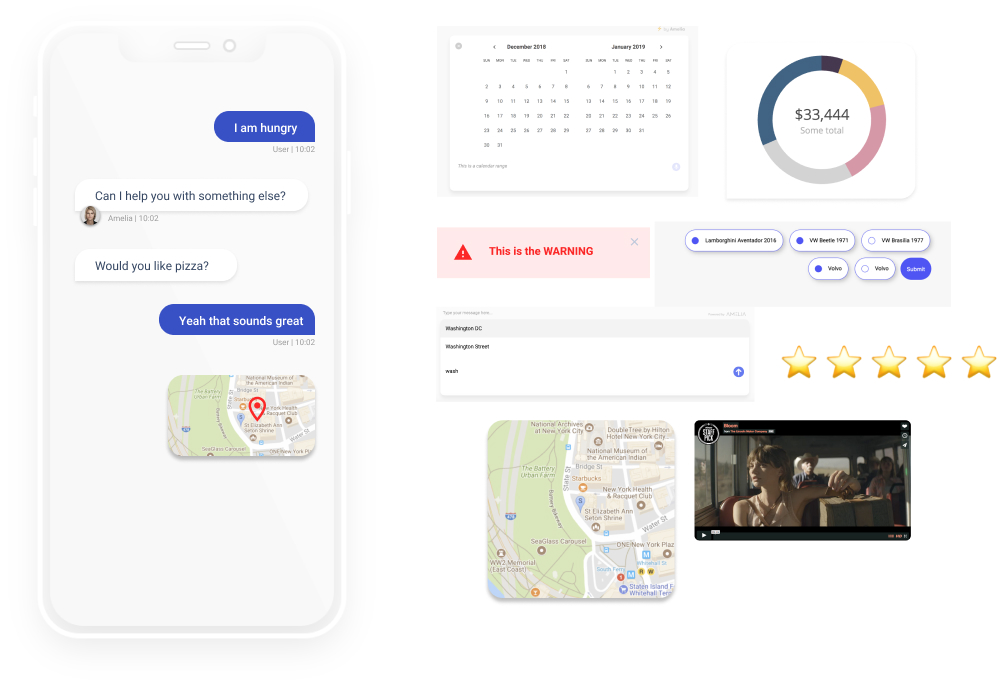
The first task was to understand the ‘work-to-be-done' of this new tool. I worked closely with engineers to make a list of all the types of interactions Amelia can have with the user and that can be generated with code. In total, we discovered 15 possible working interactions.
Users told us in research studies that sometimes they couldn’t find the interactions they wanted. We knew we had to think bigger. It was not only about finding the existing solutions, but also time to think about completely new possibilities.
Simplifying
My first iterations were focused on making things easier for content creators. I based my original idea on the ‘preview mode’ you see in other design applications. I removed all the technical jargon and included features like live preview and sharing.
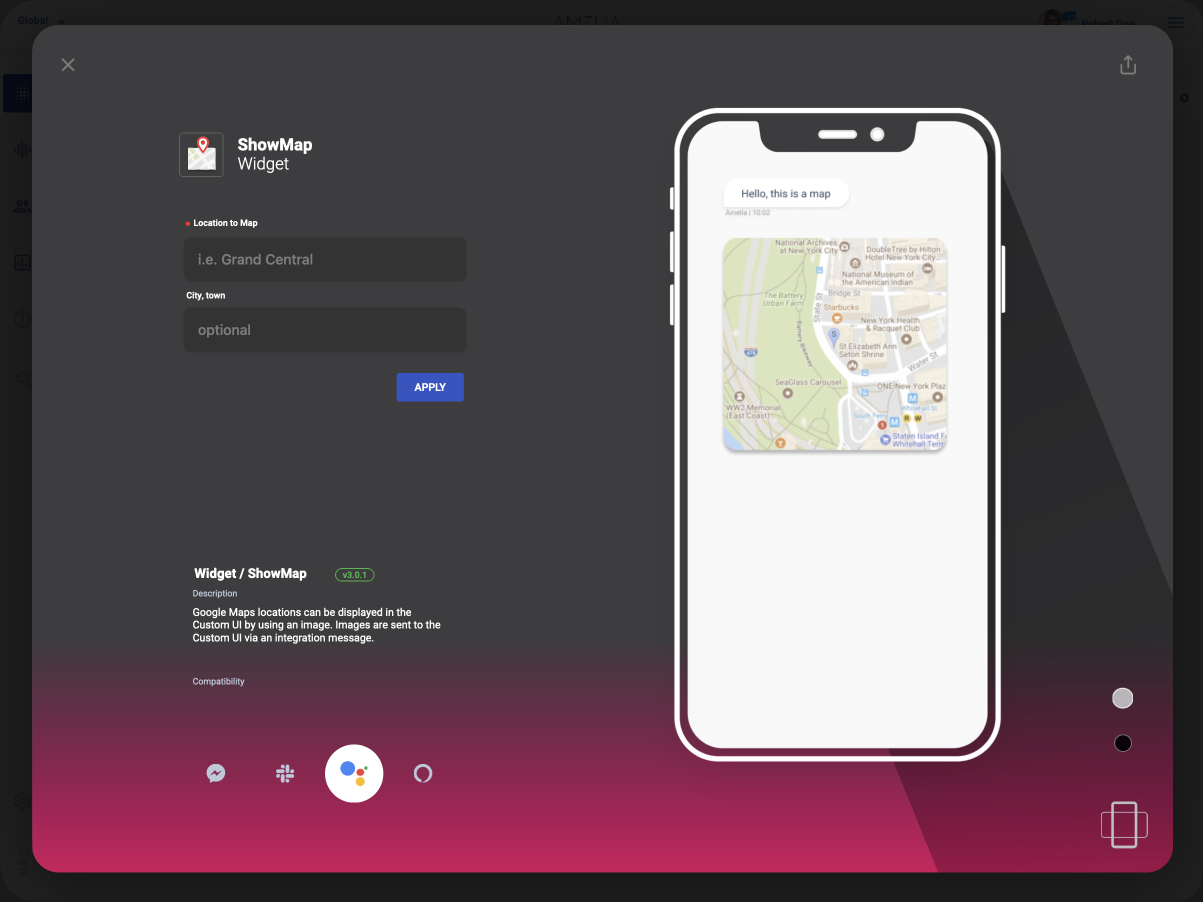
The problem was that when I tested this version with users, they had difficulties achieving the most basic tasks. That’s when I realized that maybe I went a little bit too far with the friendliness—I made it a little bit too basic. I first tried to add more complexity to this idea, but I ended up scrapping it completely.
The Solution
I arrived at the final solution after several iterations and dead ends. But what made this one work is that it had a balanced mix between complexity and ease of use. The design allows newcomers and technical people to get things done faster, and it uses flows that the user is already familiar with.
1. The Catalog
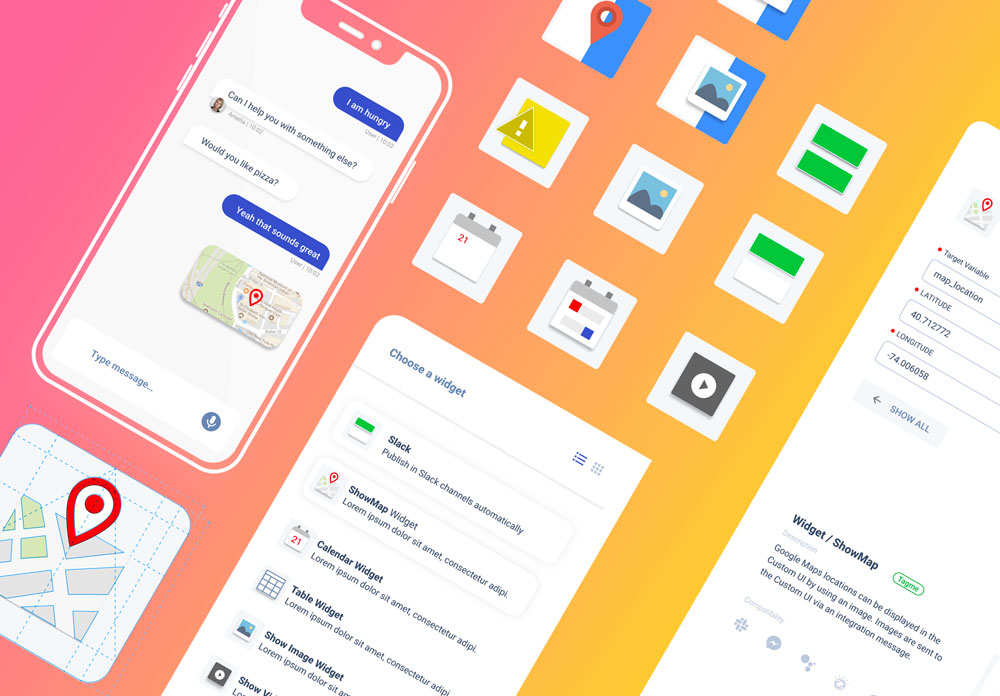
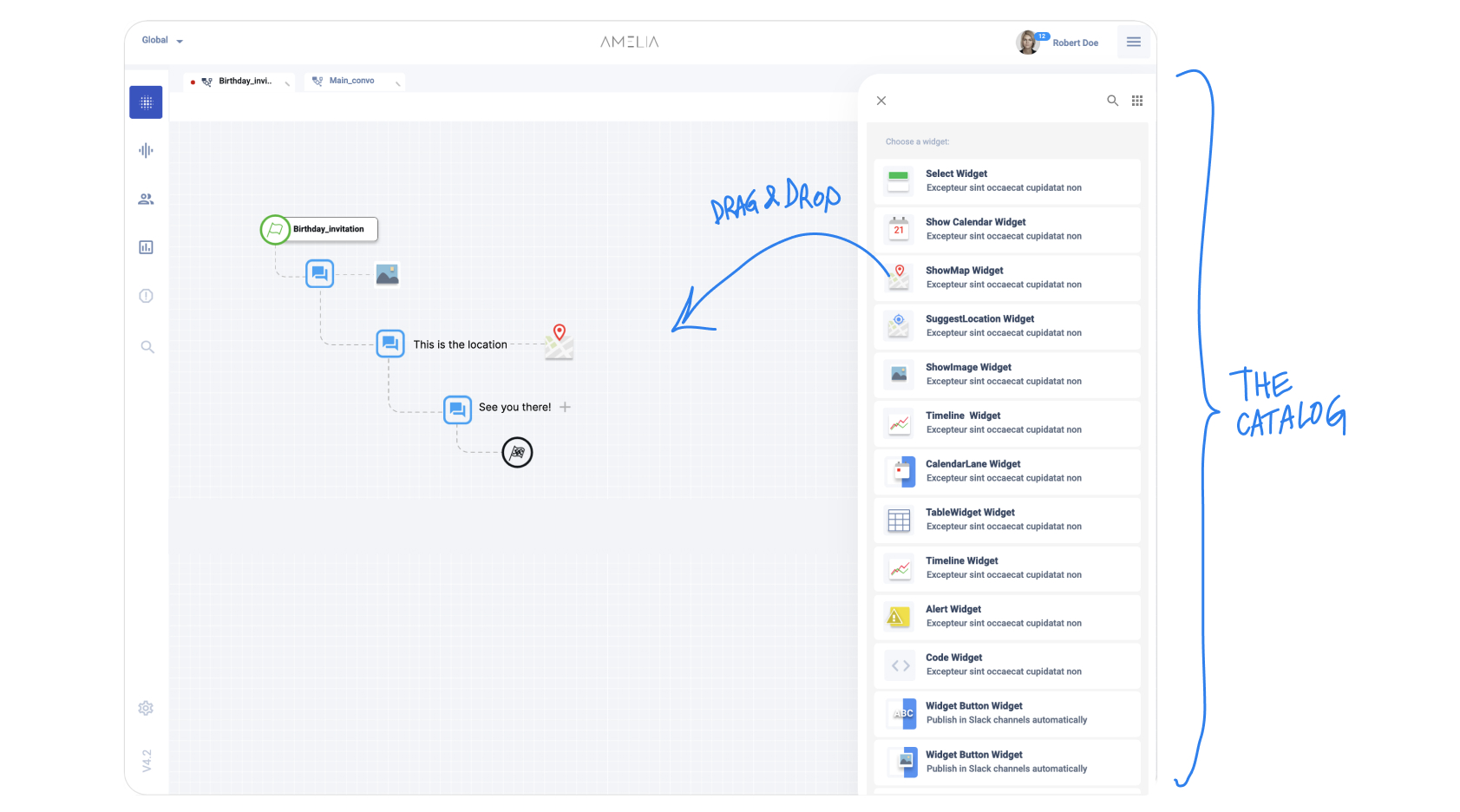
This is a drawer that shows all the available interactions (we called them widgets). Items can be dragged and dropped into the BPN designer flow. This catalog includes search and recommendations for the user.
2. The Editor + Preview
The widget editor was user-tested several times. It has everything a user needs to create rich content for chatbots, but at the same time includes some important technical aspects like in-context documentation, a compatibility matrix and a way to preview the generated UI.
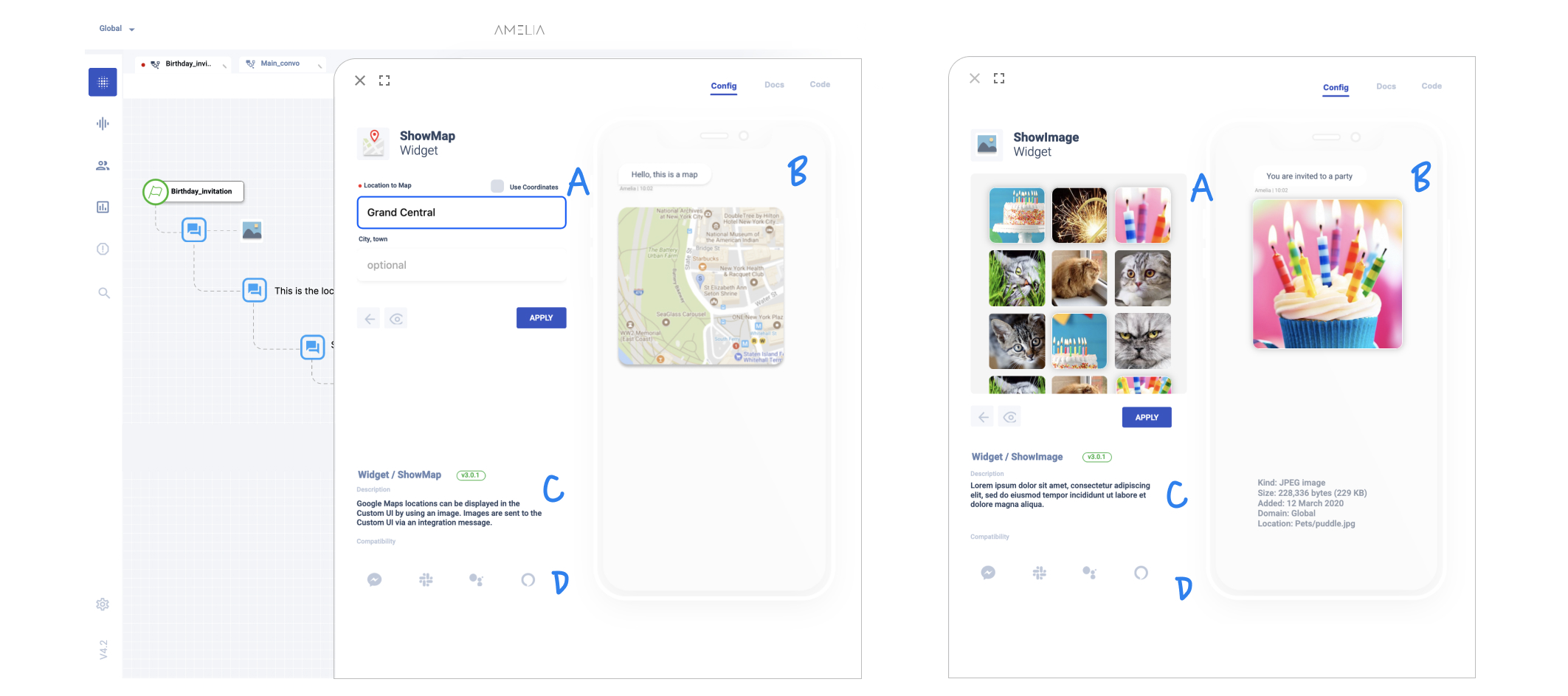
The biggest challenge for this design was to make it uniform across multiple widgets.
The preview provided the ability to preview changes in real time. This aligns with any design tool in the market and it was one of the most common requests from our users.
3. In-context Docs
Moving the documentation inside the app allowed us to deliver the right information, improving retention and onboarding of new users. The team created short versions of the documentation, explaining what each widget does and how to configure it correctly.
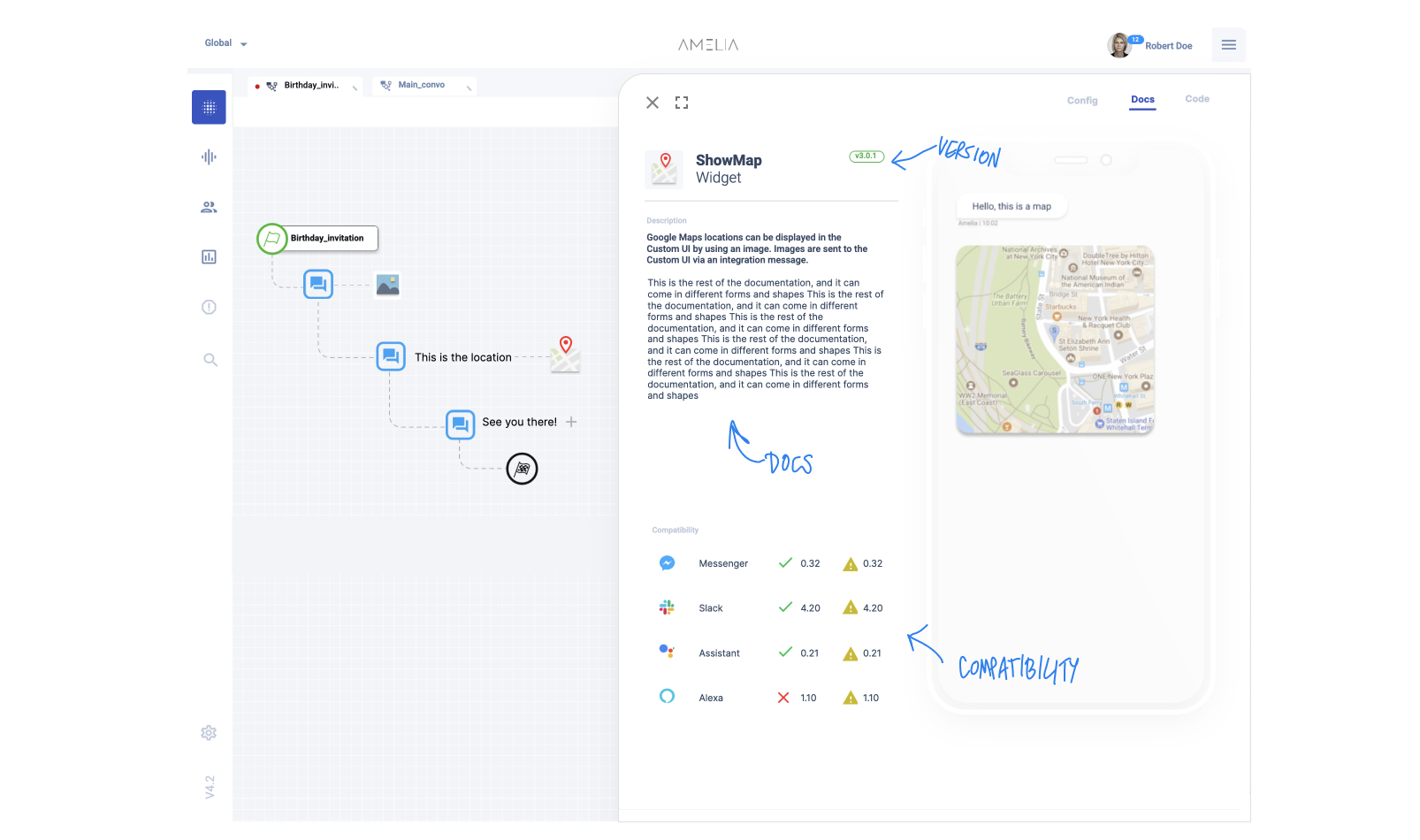
Amelia exports their conversations to multiple chatbot and conversational platforms. However, some of the features offered are not available everywhere. The compatibility table helps you understand which widgets are more adequate for the audience you are trying to reach.
4. Code Editor
One of the most important features of this redesign was not planned initially, but it came up after talking with the cognitive engineers. They explained how the current system doesn’t have templates that allow them to save code snippets to be re-used in different projects. They explained how every time they create a new chatbot using code, they need to copy and paste it from notepads or other repositories. While content creators don’t care too much for this feature, it’s being used by engineers as a template system.
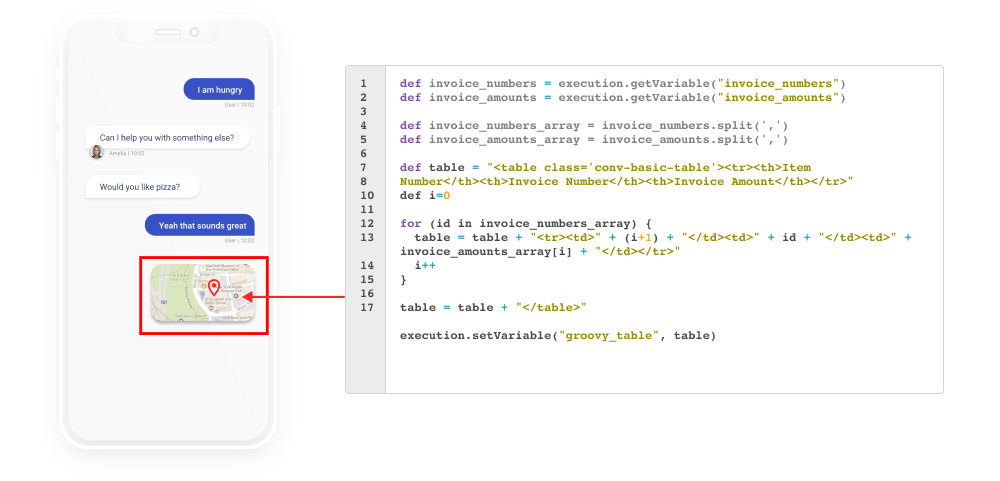
This no-code tool allows engineers to customize the widget and propel further customization.
Results
This no-code tool was first released internally and then later to big customers. We continued making interviews and observing the data to make informed decisions.
- 12 new enterprise customers (finance and insurance institutions with millions of customers).
- 1.5k content creators onboarded.
- ~40k new interactions generated.
Project Learning
It’s normal to discover new ideas along the way. These ideas are very important, especially if they are coming from conversations with the user. The team needs to be flexible and approach these as opportunities and not as deviations. It is also important to set a clear scope, drawing a line between the nice-to-haves and the useful ideas that impact our business metrics.
No-code tools are here to stay and are the best way to empower people that normally would not create an app or conversational agent. They also help engineers to focus on other things.
The introduction of new design paradigms need to be done carefully. Users will always prefer familiarity over new ways of doing things. The best way to create new things is to include some familiar components that will guide the initial user reaction.